





How can I generate the QR code/link for annual meeting/conference/banquet reservation and registration through Seatgo?
SeatGO •
2026-04-14
How can you collect information and intentions from participants in advance for events such as meetings, banquets, and annual gatherings? You can generate such reservation and registration QR codes/links through Seatgo. Users only need to scan the QR code or click the link to collect information from participants and support exporting the data in tabular form for viewing and use.
1. Register an account and log in to the tool's operation console
- Just enter the tool's backend, register an account, and log in to the operation console;
- Select the [Reservation and Registration] function and create an event; here, you can choose between text-based and poster-based styles;
2. Create a registration event - that is, configure the page style and content
- Taking the poster-style as an example, you can upload the top cover image and background image by yourself, or select an existing template to configure the page style;
- Then add form content, such as custom form items like name and phone number, and add the event time and location, etc.;
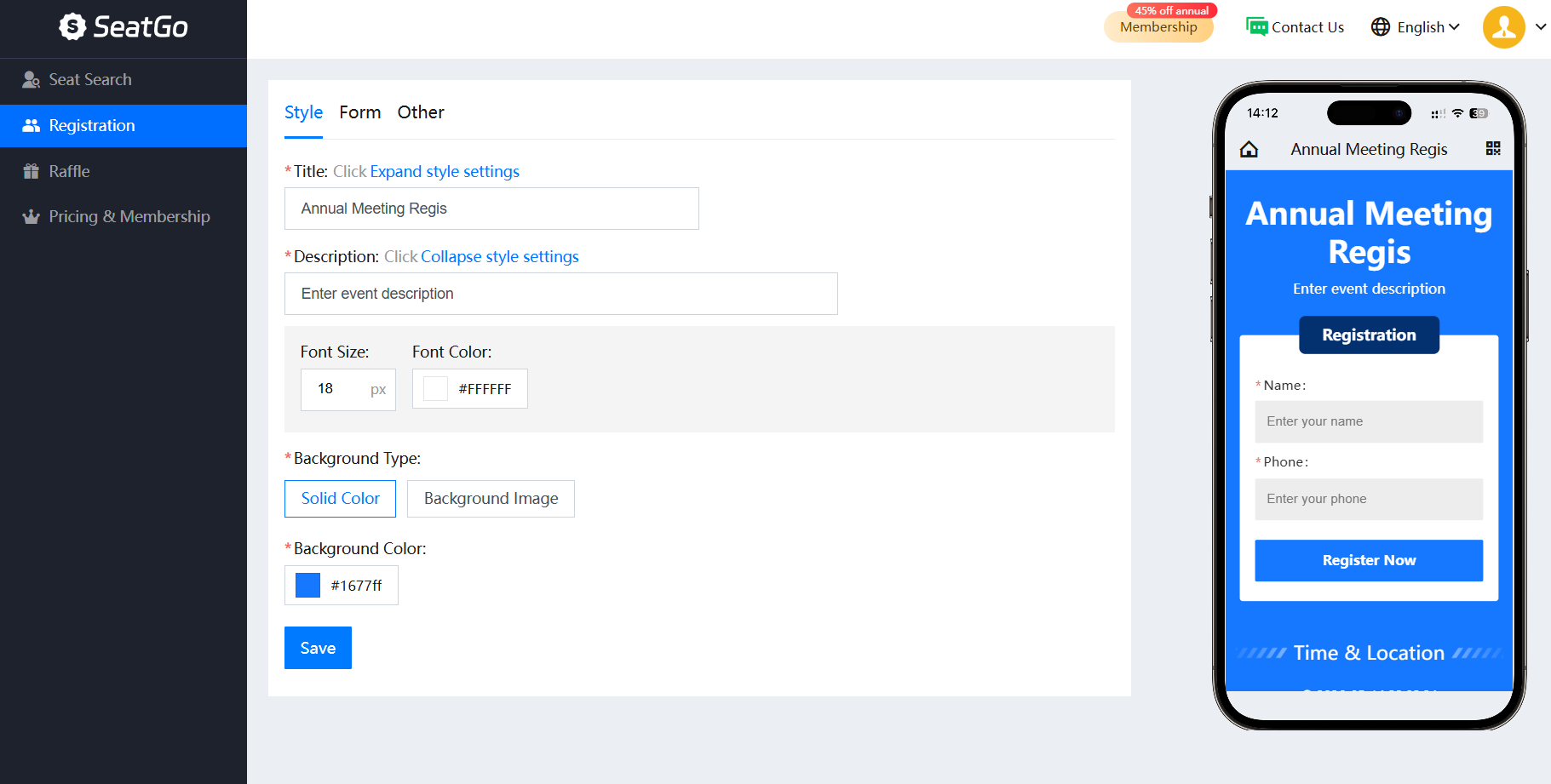
- You can choose to change the overall page theme color and the color and style of the form buttons (such as square, rounded, or fixed at the bottom);
- After completing the above steps, you can save the QR code or link for use. After creation, it will automatically jump to this page, or you can click on the event details to enter.
- The QR code remains unchanged. You can update the event page information and content at any time without replacing the code.
- Collecting user registration information supports one-click export in tabular form for viewing, or export in the seat-checking table mode for use in the check-in and seat-checking function.
Latest News
Notice
-
How to use QR codes to create an event seating chart? 2026-04-15
-
 Wedding Digital Seating Chart,How to Plan Who Should Sit Where 2026-04-15
 -
 How to generate QR codes/links for meeting sign-in/seat query through SeatGo? 2026-04-14
 -
 How can a meeting use SeatGo to implement QR code check-in and seat query? 2026-04-14
 -
 How to upload seat information of attendees in batches when using SeatGo? 2026-04-13

Related News